


Alogic today introduced several new display options that it plans to ship out later in 2024, including a 5K 27-inch touchscreen display, several ultrawide displays, and portable touchscreen monitors. The Clarity Touch 5K 27" UHD Monitor has a resolution identical to that of the Studio Display or the LG UltraFine 5K, but with the added benefit of touch integration. We previously reviewed a pair of 4K Clarity displays with touchscreen... Read more ›
18
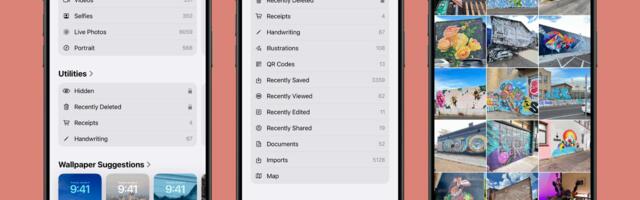
Apple introduced a new design for the iOS 18 Photos app that replaces the Library and For You sections with a more integrated all-in-one view, and part of that redesign includes an overhauled Utilities section that makes it easier to find different types of images. Rather than being limited to Imports, Duplicates, Hidden, and Recently Deleted as in iOS 17, the Utilities section of the app has all of the... Read more ›
91

Apple updated the Battery section of the Settings app in iOS 18 to add a feature that lets you know if you charged your iPhone with a "slow" charger. Periods of slow charging are shown with an orange bar in the portion of the Battery settings that show battery usage and charging over the past 24 hours or the past 10 days. We saw the slow charging notice after charging... Read more ›
517
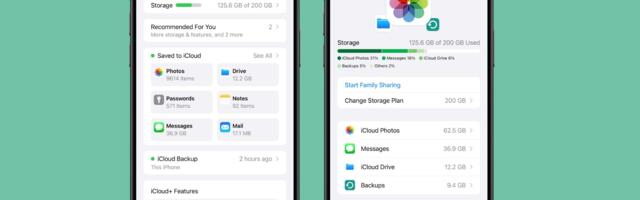
In iOS 18, iPadOS 18, and macOS Sequoia, Apple revamped the iCloud section of the Apple Account (formerly Apple ID) that's available in the Settings app. The redesigned interface has much of the same functionality, but a "Saved to iCloud" feature makes it clearer how storage is being used. Saved to iCloud replaces Apps Using iCloud, and it provides more information at a glance. Rather than just listing whether iCloud... Read more ›
201

Since there was so much to take in at yesterday's WWDC keynote event, we thought we'd revisit iOS 18 and highlight some of the most exciting features that Apple introduced. Subscribe to the MacRumors YouTube channel for more videos. Read more ›
69

macOS Sequoia has a fun new Macintosh dynamic wallpaper and screensaver combination that highlights classic Mac icons. Basic Apple Guy shared some high resolution screenshots of the new wallpaper, which can be used on other Apple devices. On device, the Macintosh wallpaper animates and shifts through different retro graphics, with color options that include Spectrum, Accent, Blue, Red, Purple, Yellow, Dark Gray, Gray, Green, Orange, and Random. Macintosh isn't the... Read more ›
153

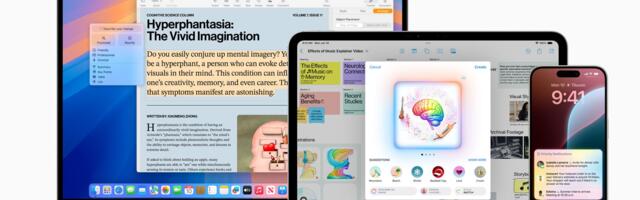
iOS 18, iPadOS 18, and macOS Sequoia will all have built-in "Apple Intelligence," and one of the new AI features includes an Image Playground. With Image Playground, you can generate an image from a prompt, similar to what you can do with OpenAI's ChatGPT. While you can come up with anything, Apple will provide a selection of suggested concepts in categories like themes, costumes, and places. Apple Intelligence isn't out... Read more ›
111

Blackmagic Design has announced the Blackmagic URSA Cine Immersive camera designed for shooting spatial video content for Apple's Vision Pro headset. The URSA Cine Immersive camera features a custom stereoscopic 3D lens system with dual 8K sensors, capable of capturing a 180-degree field of view with spatial audio support. It is designed to capture content with a resolution of 8,160 x 7,200 per eye and offers 16 stops of dynamic... Read more ›
716

The Notes app in iOS 18 and iPadOS 18 supports colors for typed text for the first time, providing an option to add new hues to text. Apple offers five colors, including purple, pink, orange, mint, and blue, and there is no option for custom colors. Colors can be added to text through the formatting interface that can be accessed by tapping on the Aa button, with the shade applied... Read more ›
167

Apple has revamped the song queuing system in the Music app on iOS 18, and early reaction to the changes has been overwhelmingly positive. Notable changes include a new "Add Songs to Queue" button at the bottom of the queue, an option to clear the entire queue all at once, and the ability to change the currently playing song without having the queue disappear. In addition, the former "Play Last"... Read more ›
206

iOS 18 includes a small but interesting change for the buttons on the iPhone, adding more of a visual element when changing volume, activating the Action button, or locking the screen. When you press an iPhone button in iOS 18, the display bezel bulges outward slightly. This feature is available for the volume buttons, Action button and the power button, and it will also likely be used for the Capture... Read more ›
1,051

Earlier this year, we reported that "Apple ID" would be renamed to "Apple Account," and this change has now been officially announced. Apple confirmed the change in a press release today, with "Apple Account" branding now used across iOS 18, iPadOS 18, macOS Sequoia, and watchOS 11:With the releases of iOS 18, iPadOS 18, macOS Sequoia, and watchOS 11, Apple ID is renamed to Apple Account for a consistent sign-in... Read more ›
372
Apple's stock price has crossed the $200 mark and reached a new all-time high in intraday trading, one day after the company unveiled its Apple Intelligence suite of AI features coming with iOS 18, iPadOS 18, and macOS Sequoia. Generative AI has been a hot topic ever since ChatGPT debuted in 2022, and investors had been waiting for Apple to unveil its own plans for the technology. Nvidia briefly surpassed... Read more ›
0

Apple has shared updated iOS 17 and iPadOS 17 adoption figures, revealing how many iPhones and iPads were running those software versions before WWDC. These adoption numbers are based on iPhones and iPads that transacted on the App Store on June 9, the day before WWDC began, according to Apple. The statistics are as follows: 77% of all iPhones were updated to iOS 17. 68% of all iPads were updated... Read more ›
0

With the first beta of iOS 18 now in the hands of developers, there are a handful of smaller changes and quality-of-life improvements being discovered in Apple's iPhone software that are worth highlighting. First up, Apple has improved the flashlight controls. In iOS 18, turning on the Flashlight via the Lock Screen or Control Center now brings up a small interface that lets you adjust the flood of light from... Read more ›
189

In addition to text effects and scheduled messages, iOS 18 adds a small but helpful change to iMessage: link card previews for more types of content. Screenshot: Aaron Perris When you paste a link for a social media post into the text field in the Messages app, the associated link card now appears before you send the message, whereas it previously only became visible after the message was sent. It... Read more ›
18

As part of its Apple Intelligence feature set, Apple on Monday announced a partnership with OpenAI that will allow Siri to access ChatGPT directly in iOS 18, iPadOS 18, and macOS Sequoia to provide better responses in relevant situations. In conversation with reporters after the WWDC keynote, Apple's senior VP of software engineering Craig Federighi revealed that as Apple Intelligence evolves, the company eventually wants to give its users a... Read more ›
740

During its WWDC 2024 keynote on Monday, Apple introduced a new Calculator app for iPad that includes a new Math Notes feature, and there are similar changes to be found in the Calculator app in iOS 18. The Calculator app on iPhone now has an additional button to switch between Basic, Scientific, and Math Notes in portrait or landscape view. Meanwhile, there's a useful new History feature that helps you... Read more ›
205
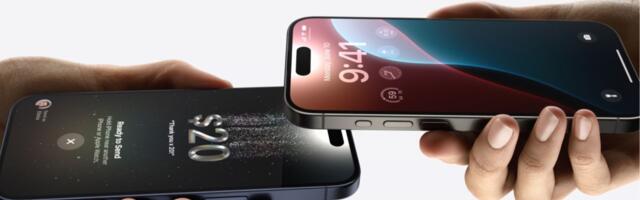
Among the slew of iOS 18 updates announced during Apple's WWDC 2024 keynote, the company revealed a new way of paying for things with Apple Cash, called Tap to Cash. As the name suggests, Tap to Cash lets users pay for things simply by tapping two iPhones together. The feature is reminiscent of NameDrop, where users can exchange contacts by tapping their devices together. Tap to Cash is an extension... Read more ›
268
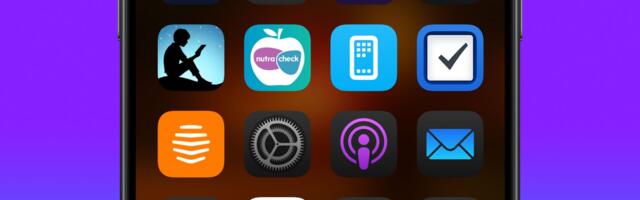
As part of its Home Screen customization overhaul, iOS 18 lets iPhone users hide the labels on app icons for a cleaner look. Turning off the labels causes the icons to expand and take up the space where the text usually appears underneath. Here's how it currently works in the iOS 18 Developer Beta. On the Home Screen, press and hold on an empty area. Tap Edit in the top-left... Read more ›
529
Most popular sources
 ScienceDaily
|
0% |
 Tech Wire Asia
|
0% |
 Sifted
|
0% |
 ReadWrite
|
0% |
 UK Tech News
|
0% |
| View sources » | |
LIKE us on Facebook so you won't miss the most important news of the day!
11.07.2026 05:24
Last update: 05:10 EDT.
News rating updated: 12:16.
What is Times42?
Times42 brings you the most popular news from tech news portals in real-time chart.
Read about us in FAQ section.